

SmartVMS
Status: LiveSmarter surveillance. Safer people. Stronger businesses.
Turn your existing CCTV and IP cameras into intelligent monitoring tools that help your teams spot safety risks, security incidents and operational events, tailored to your site and requirements.
Printing it? Download the printable brochure (PDF)
- For
- Factories, warehouses, hospitals, campuses, retail, buildings, transport and public spaces
- Deployment
- Web application that works with your existing CCTV and IP cameras.
- Commercial model
- Tailored proposal on request.
The challenge
Cameras record everything, but nobody can watch everything
- Security teams cannot watch every screen, so incidents are found after the fact.
- Safety risks like missing PPE, blocked exits or entry into danger zones go unnoticed.
- Finding the right moment in hours of footage takes too long.
- Cameras, recordings and storage are managed in separate tools at each site.
The solution
How SmartVMS works
SmartVMS adds AI video analytics to the cameras you already have: it flags fire, PPE gaps, danger-zone entry, fights, weapons, collapses and more for your team to review, alongside live monitoring, smart playback and centralised camera management.
Choose from 55 AI video analytics use cases across six areas: person analytics, activity and incident detection, vehicle and traffic analytics, driver assistance, object and environment analytics, and industrial and workplace safety. We tailor the set to your industry, your key concerns and your cameras.
Capabilities
What it covers
Each group shows its current availability.
AI video analytics
Available- 55 AI use cases across six areas
- Person analytics (16) and activity and incident detection (4)
- Vehicle and traffic analytics (11) and driver assistance (4)
- Object and environment analytics (8) and industrial and workplace safety (12)
AI safety alerts
Available- Fire and smoke
- Person collapse: falls or possible unconscious-person events
- PPE compliance: helmets, vests and other protective equipment
- Entry into restricted or danger zones
AI security alerts
Available- Fights and violence
- Suspected visible weapons
- Women's safety: concerning surrounding or isolation scenarios
AI vehicle and people analytics
Available- Number plate reading (ANPR) for gate and parking workflows
- Crowd and people counting: occupancy, density and footfall
- Driver fatigue: possible drowsiness and distraction
AI for your industry
Available- Factories and warehouses: PPE, danger zones, forklifts, fire, blocked exits
- Hospitals, campuses and offices: collapse alerts, crowd counts, fire and security
- Retail and malls: footfall, dwell time, inventory and incidents
- Buildings: ANPR, parking, perimeter and safety
- Transport and logistics: ANPR, driver fatigue, traffic and fleet safety
- Public spaces: crowds, incidents, unattended objects and security
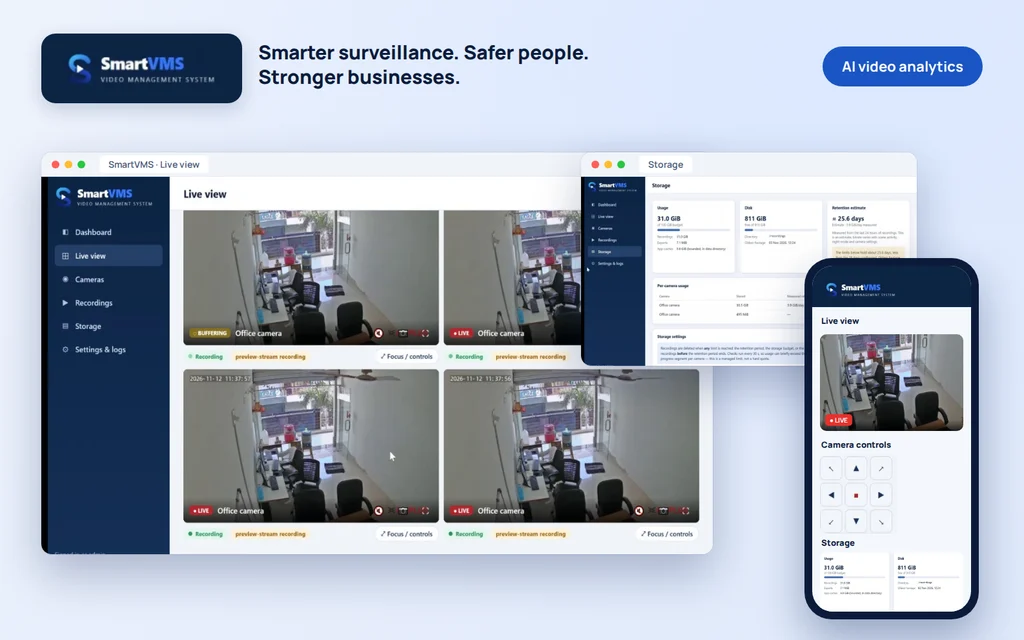
Live monitoring
Available- Live view of many cameras at once
- Focus on one camera for a closer look
- Recording status shown on every feed
Camera control
Available- Pan, tilt and zoom from the browser
- Adjustable speed and a home position
- One person controls a camera at a time
Recordings and playback
Available- Continuous recording from every camera
- Smart playback to find the right moment
- Export clips when you need them
Storage management
Available- Storage usage per camera
- Retention period, storage budget and free-space limits
- A retention estimate from real recording rates
Deployment and performance depend on camera setup, lighting, environment, integrations and validation.
Alerts support human review; they do not replace it.
Privacy and applicable legal safeguards are required for sensitive analytics.
Who it's for
Intended users
Security teams
Watch live feeds and review AI alerts instead of every screen.
Safety officers
Track PPE, danger zones, fire and smoke, and blocked exits.
Operations managers
Use footfall, occupancy and vehicle data to run sites better.
IT and administrators
Manage cameras, recordings, storage and access in one place.
Typical workflows
From challenge to live alerts
- Tell us your industry, key concern and approximate camera count
- We explore the right fit in a demo or feasibility discussion
- We connect your existing cameras and tailor the alerts to your site
- Your team reviews alerts as they happen
Alert to action
- The AI flags an event on a camera
- Your team reviews the live feed or recording
- They act on it, or dismiss it
- The footage stays available for playback and export
Intended benefits
What it is designed to improve
- More value from the cameras you already have
- AI alerts surface safety and security events for faster review
- Live view, playback, cameras and storage in one place
- AI analytics tailored to your industry and site
Product status
Status: LiveSmartVMS is live. Whether you manage one location or many, share your industry, key concern and approximate camera count, and ask for a demo, a feasibility discussion or a tailored proposal.
FAQ
SmartVMS questions
See SmartVMS in action
Tell us about your organisation and we'll arrange a demonstration or walkthrough.